As a community care case manager, your day often involves hours of desk work, reading and writing detailed reports to ensure your clients receive the best care possible. While your dedication is admirable, extended sitting can have unintended consequences for your health. Professor Marc Hamilton* highlights a concerning link between prolonged sitting and increased risks of heart disease, type-2 diabetes, and obesity. For those who leave their desks to spend the evening seated in front of the TV, the risks multiply.
The good news? You can take small, actionable steps throughout your workday to counteract these risks and boost your overall well-being. Incorporating movement into your routine is just as essential as regular exercise, and it can be surprisingly simple. Standing during phone calls, placing your bin away from your desk, and opting for the stairs over the elevator are easy ways to stay active. Printing documents to a remote printer is another smart hack that gets you moving while keeping your workflow seamless.
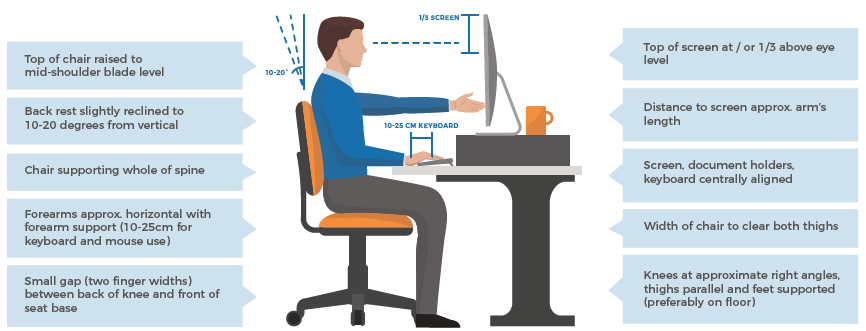
Beyond movement, ensuring your workstation setup promotes comfort and productivity is equally important. Ergonomic adjustments might feel unusual at first, but they’re worth the trial period to prevent discomfort and strain. Daily checks of your workspace and regular micro-breaks—whether a quick stand every 30 minutes or a 5-second eye refocus every 5 minutes—can make a big difference.
Ready to transform your workday?
By prioritising an active and ergonomically sound workspace, you’ll not only reduce health risks but also enhance your focus, productivity, and engagement. This benefits not just you but also the quality of service you provide to your clients. After all, a healthy worker is a more effective worker.
Sitting At Your Desk
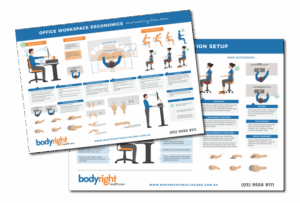
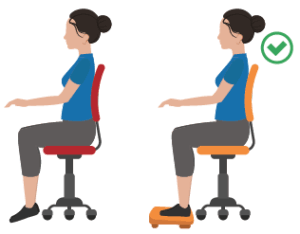
FOOTREST Footrests are a plan B when a desk is too tall and cannot be adjusted (adjusting desk height to suit you is preferable). Always use a footrest if you cannot reach the floor
DOCUMENT HOLDERS Can be used to help place documents into a better position when current document use places the body in prolonged, repetitive or awkward postures
DESK STORAGE & SHELVING Workers should avoid over reaching or twisting and bending their spine to grab objects from shelving and cupboards Objects commonly used should be stored and placed in positions of easy reach and where twisting and bending can be limited
Desk Accessories & Mouse
MOUSE Ensure you are not over-reaching for your mouse by keeping it adjacent to your keyboard and elbow by your side
TELEPHONES Avoid holding the phone between your ear and shoulder. Where possible, use a headset to avoid neck and shoulder strain
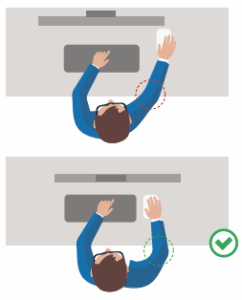
Your Mouse
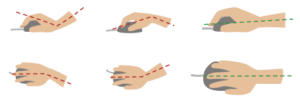
WRIST SUPPORT Can be used for typing on the keyboard and using the mouse to place the wrist and hand into neutral
Get Your Own Ergonomic Workstation Setup PDF
Click here to download or contact us and we’ll email it through to you, simply call (03) 9558 9111 or email to [email protected].